Ethernet adapter for Siemens S7-300 and S7-400 PLCs
Older Siemens S7-300 and S7-400 PLCs often have no Ethernet interface. An Ethernet adapter for the Profibus/MPI port adds one without a CP – an alternative to the CP343 and CP443. We show how this works and which adapter has been tested with DataSuite.
Why a retrofit can cause problems
Retrofitting an existing plant without a Profinet interface can be expensive and complicated. Old Siemens CPUs of the S7-300 or S7-400 type, which have no on-board Ethernet interface, are often still in use. You can add this interface with Siemens CPs (CP343 or CP443). However, this requires a free slot in the S7 rack. In addition, the system configuration has to be adapted. It is easier with an Ethernet adapter that plugs directly into the Profibus/MPI port of the CPU: plug it in, configure it via the web, done.
Another problem can arise if you want to use data from old S7-300 controllers. Machine data is often transferred directly to ERP systems. However, the 300 series PLCs are known for an internal clock that can be rather inaccurate. One possible consequence: inconsistent data records in the ERP system. We offer a solution for this: the SPSTimeMaster.
Ethernet adapter instead of a CP
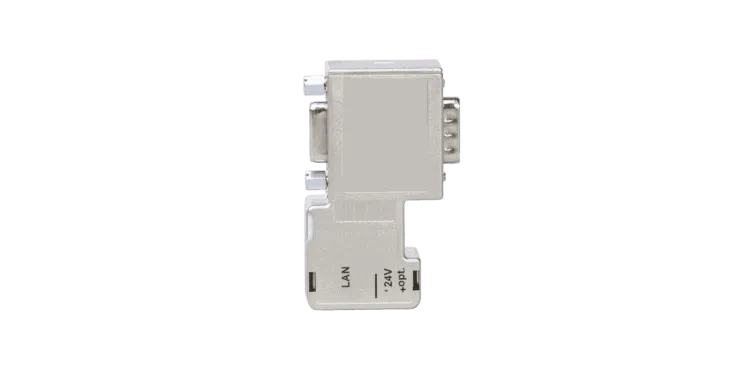
Plug-type Ethernet adapters are available from several manufacturers. We have tested the NETLink PRO Compact from Helmholz (product number 700-884-MPI21) with DataSuite. It plugs directly into the Profibus/MPI port of the PLC and, according to the manufacturer, is suitable for Simatic S7-200, S7-300 and S7-400. Power is supplied by the CPU of the automation device or, optionally, externally with 24 V DC. A standard Cat-5 cable is all you need for the network connection.
We do not sell the adapter ourselves. You can buy it directly from Helmholz or from a distributor.
What are the advantages of such an adapter over a CP?
Note: This extension opens up many new possibilities for you. DataSuite is the data centre for your PLC: Excel files, databases, PDF, e-mail, SMS, HTML, printing and more.
System set-up with DataSuite
The adapter plugs into the Profibus/MPI port of the CPU and is then configured via its web interface.

Your controller then has an Ethernet interface through which DataSuite communicates with it. You can obtain the adapter directly from the manufacturer: Helmholz NETLink PRO Compact. If you have questions about connecting it to DataSuite, please get in touch via our contact page.
Conclusion
With an Ethernet adapter such as the Helmholz NETLink PRO Compact, you can add an Ethernet port to older S7-300 and S7-400 PLCs without a CP. The adapter has been tested with DataSuite; you buy it directly from the manufacturer.