PLC-PC data exchange without an OPC server: S7 direct or OPC UA?
Does there always have to be an OPC server between the PLC and the PC? No. Here we show when a direct S7 connection is enough and when OPC UA is the better fit.
Two ways from the PC to the S7
Today there are two common ways to exchange data between a Siemens S7 and a Windows PC:
Direct S7 connection
The PC addresses the controller over Ethernet using the S7 protocol (ISO-on-TCP according to RFC 1006). There is no server in between that has to be set up or licensed. On the S7-1200 and S7-1500, PUT/GET access must be permitted in the TIA Portal, and the data blocks being read must not be optimised.
OPC UA
The controller provides its data via an OPC UA server, and the PC accesses it as an OPC UA client. The S7-1500 and newer S7-1200 CPUs include this server; it is activated in the TIA Portal and requires a runtime licence from Siemens. The older OPC DA, with a separate OPC server on the PC, hardly plays a role in new projects any more.
How fast a direct connection is
We measured the speed of a direct connection with an S7-1212C. DataSuite read 39 data sets each of 10, 30 and 50 bytes from a data block and wrote each of them to an Excel file.
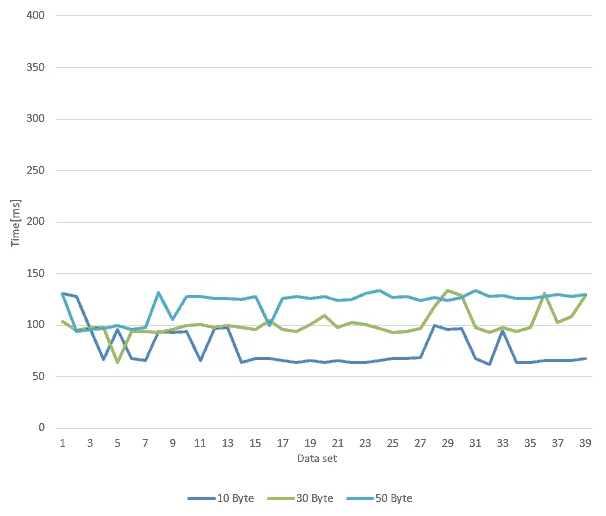
All values are below 150 ms per data set. Most of that time is needed for writing the Excel file. The pure transfer between the S7-1200 and the PC took around 10 to 12 ms; with an S7-1500 under almost ideal conditions we reached transfer times of around 1 ms.
How fast it is in your plant depends mainly on these factors:
You can measure the response times of your own controllers with the free PLC Scanner from PLC DataTools.
Direct S7 connection and OPC UA compared
| Direct S7 connection | OPC UA | |
|---|---|---|
| Speed | very fast, no server in between | usually somewhat slower |
| Costs | no additional licence | OPC UA runtime licence for the controller |
| Set-up in the PLC | permit PUT/GET, non-optimised data blocks | activate the OPC UA server; optimised blocks possible |
| Security | unencrypted | encrypted, login with user name and password or certificate |
| Controllers | Siemens S7, including older S7-300 and S7-400 | international standard, other manufacturers too |
You can find out more about OPC UA and how to set it up in the TIA Portal in the article How to use OPC-UA with a Windows client.
Which option suits your project?
A direct S7 connection is a good choice if …
OPC UA is the better choice if …
Both options in one software
You do not have to make the same decision for every controller. DataSuite works as a Windows client and connects to each controller either directly via “S7 - Put/Get” or via “S7 - OPC UA”; with the “OPC UA” type it reaches any OPC UA server. Once the connection is set up, you work with the data in the same way in both cases: DataSuite writes it to Excel and PDF files, HTML pages or SQL databases.
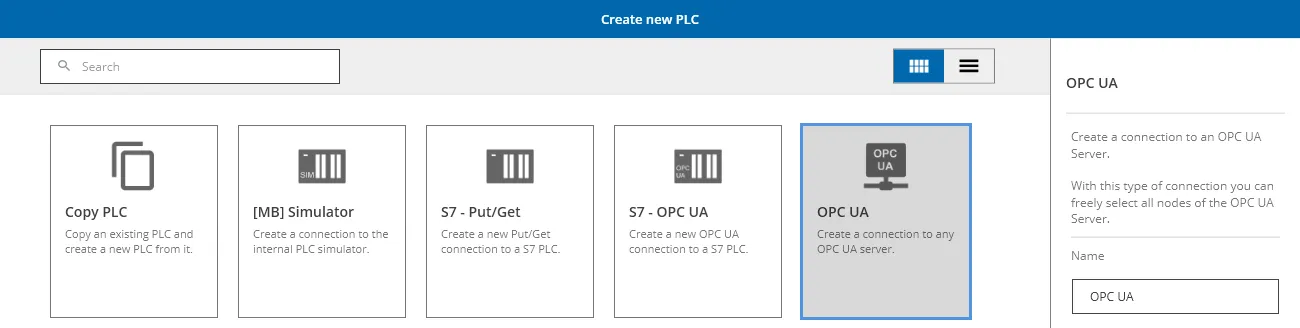
You can test DataSuite free of charge. The manual with detailed instructions is included in the download.
Further information and help free of charge from our support team:
Phone: +49 2742 72927 80
Email: support@mb-datasuite.com
Conclusion
An OPC server is not a must for PLC-PC data exchange. A direct S7 connection is fast, needs no additional licence and also connects older controllers. OPC UA is the standard when encryption, optimised data blocks or controllers from other manufacturers are required. With DataSuite you can use both options side by side.