Send PLC alarms via Telegram or Threema
A fault in the plant, and you know about it right away on your phone. DataSuite sends alarms from your PLC via Telegram or Threema. Here is how to set it up.
How the alert gets from the controller to your phone
DataSuite monitors the variables of your controller. A trigger reacts to a condition, such as a fault bit or a limit value, and then runs the action “Send message”. The message goes via Telegram or Threema to a person or a group and can contain current values from the controller, for example the fault code.
Like email and SMS, Telegram and Threema are part of DataSuite's alerting. It is included in the STANDARD, PRO and FLAT editions (prices). Which faults are worth an alert is covered in the article Respond faster to faults with factory alarms.
Setting up Telegram
Telegram sends the messages via a bot. Bots are free of charge, and creating one takes only a few minutes.
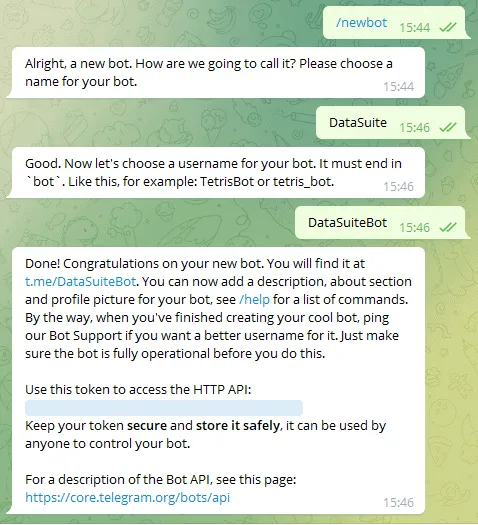
Create a bot with BotFather
- Search for “BotFather” in the Telegram app on your PC or smartphone and open the chat.
- Write
/startto begin the dialogue. - Write
/newbotand enter a name. It will later appear as the sender in the chat. - Choose a user name for the bot. It must end in “bot”, for example “Roller1Bot”.
- BotFather replies with the API token of your bot. Keep it safe: anyone who knows it can control the bot.
Create a group and add the bot
A bot writes to a group it is a member of. This way one message reaches everyone who is responsible for a machine, for example.
- Create a new group from the side menu of the Telegram app and add the bot as a member.
- Open “Manage group” via the three dots at the top right and set the “Group type” to “Public Group”.
- Enter a link name, for example the name of the group, and save in both dialogues.
You will later enter the link name of the public group in DataSuite as the recipient, preceded by @, for example @Walze1Halle4.
Using a private group
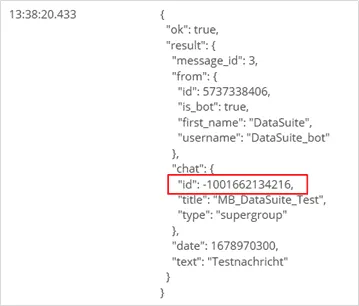
If the group should not be public, you need its chat ID. Run the trigger once with the public group and then open its log. In Telegram's reply, the ID is in the chat section, not in the from section. Copy it in full, including the minus sign at the beginning, as the recipient. You can then set the group to private.
Create a Telegram account in DataSuite
- In DataSuite, click “Create new account” under “Accounts”.
- Select “Telegram account” and click “Create”.
- Enter the token of your bot as the API key.
The time limit of the account sets the maximum number of messages per minute and per hour. This prevents a flood of messages if a condition keeps changing.
Setting up Threema
Threema sends messages from software via the Threema Gateway. It is a paid service from Threema; each message costs gateway credits. DataSuite only forwards the request to the gateway, so make sure there is always enough credit.
What you need
- a gateway ID as the sender: it always starts with an asterisk, for example
*ABC1234 - the secret for this gateway ID, which you receive after creating it in the Threema Gateway
- the Threema app on the recipient's side; for companies, Threema Work lets you manage the accounts centrally
The name the app shows as the sender is the “public name” of the gateway. You set it on the gateway page.
Create a Threema account in DataSuite
Under “Accounts”, use “Create new account” to create a “Threema account” and fill in these fields:
- Sender: your gateway ID with the asterisk at the beginning
- API key: the secret of the gateway ID
- Debug mode: while it is active, DataSuite does not send any requests to the gateway. This lets you test triggers and conditions without using credits.
The Threema account also has a time limit for messages per minute and per hour. With Threema in particular, it protects you from high costs caused by messages sent by mistake during commissioning.
Sending the message in a trigger
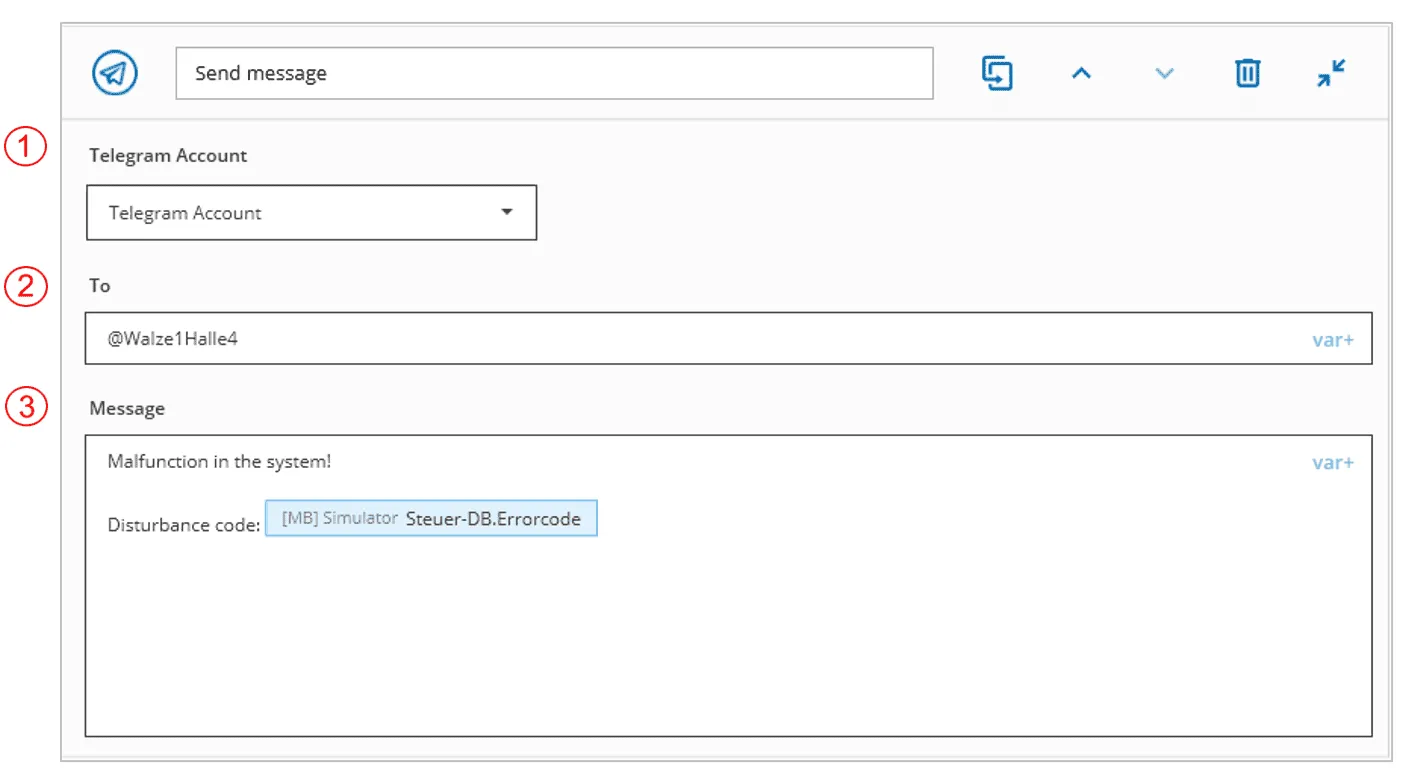
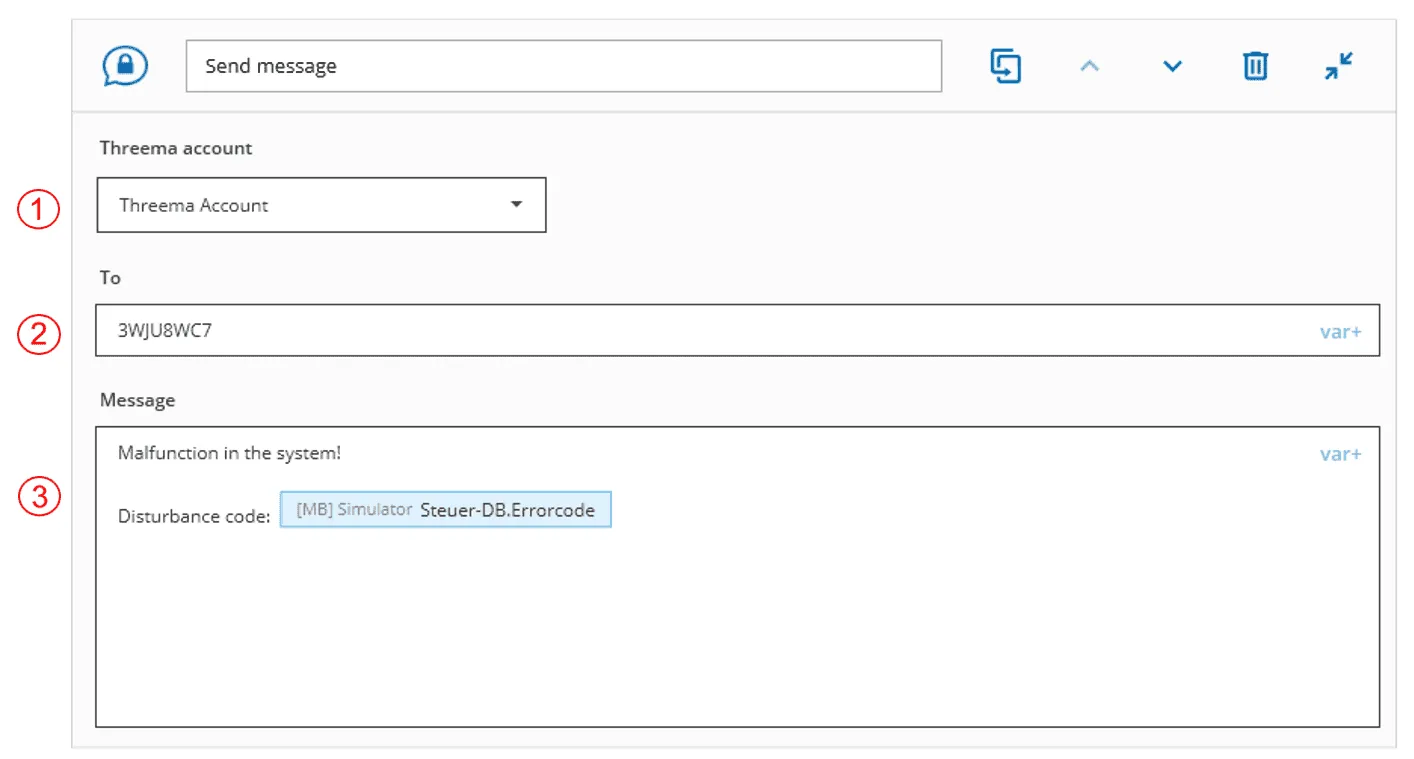
Create a trigger with the condition the alert should react to and add the action “Send message” for Telegram or Threema. The action has three fields:
- Account: the Telegram or Threema account used to send the message
- To: for Telegram, the link name of the group with @ or the chat ID of the private group; for Threema, the Threema ID of the recipient; variables are possible here too
- Message: the text of the alert; use “var+” to insert variables from the controller, such as the fault code
You can test DataSuite free of charge and try out the alerting with the built-in PLC simulator before you connect a real controller.
Error codes
If a message cannot be sent, DataSuite reports an error code. Telegram uses the range 2000 to 2099, Threema 2100 to 2199. Details are in the trigger log.
| Telegram | Threema | Meaning |
|---|---|---|
| 2000 | 2100 | Ok |
| 2001 | 2101 | Unknown error |
| 2010 | 2110 | Account invalid (see log) |
| 2011 | 2111 | Sender invalid |
| 2012 | 2112 | API key is invalid |
| 2013 | 2113 | Account not found |
| 2020 | 2151 | Too many messages in the last hour or minute (time limit) |
| – | 2160 | The request could not be executed (see log) |
| – | 2161 | Authorisation error (see log) |
| – | 2162 | The credit of the Threema Gateway is insufficient |
If you get stuck, our support team will help you free of charge:
Phone: +49 2742 72927 80
Email: support@mb-datasuite.com
Conclusion
With DataSuite, fault alerts from the controller go straight to your phone. Telegram is quick to set up and free of charge: create a bot with BotFather, add it to a group and enter the token in DataSuite. Threema runs via the paid Threema Gateway; debug mode and the time limit keep costs under control during commissioning. In both cases the message can contain current values from the controller.